Thumbnail Interpretation
The Epoch API generates diagnostic thumbnails for each processed plot and supply shed. These visual outputs help analysts quickly assess deforestation risk, biomass trends, and biodiversity without loading raw raster data in a GIS tool.
▶EUDR Deforestation Thumbnails
▶Three-Panel Layout
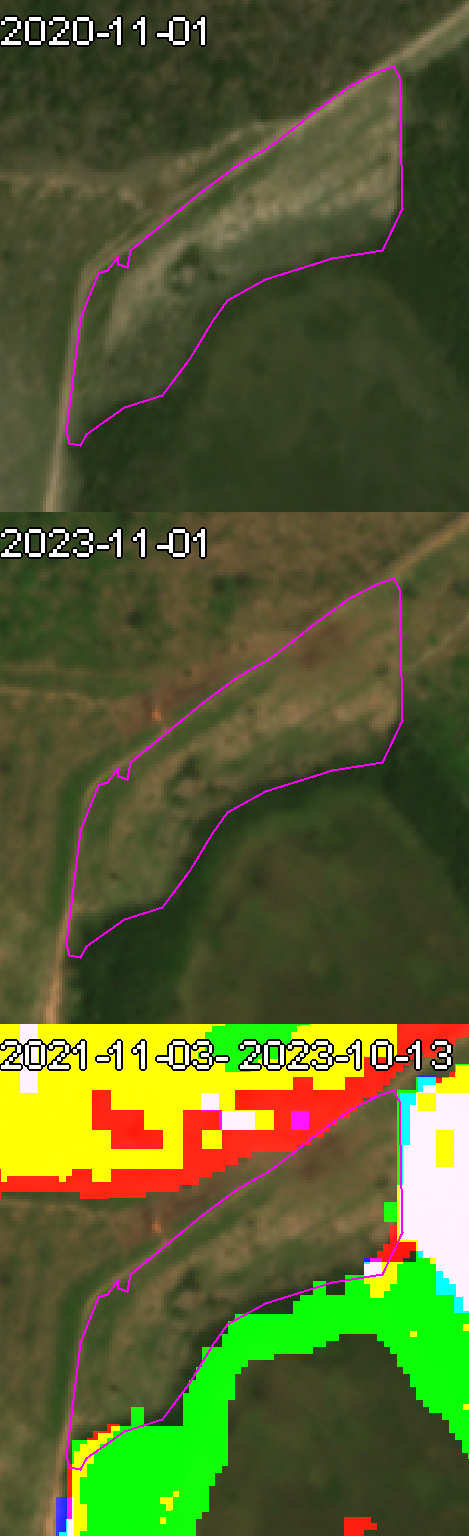
Each deforestation thumbnail consists of three vertically stacked panels:
- Top — Before: Satellite imagery from the start of the monitoring period (typically the EUDR cut-off date, December 31, 2020)
- Middle — After: Satellite imagery from the end of the monitoring period. Taken from the same time of year as the "before" image for seasonal comparability.
- Bottom — Overlay: Color-coded analytical overlay combining deforestation alerts, commodity presence, and natural forest baseline.
▶Color Channel System
The overlay panel encodes three independent data layers as RGB color channels. Where layers overlap, colors blend additively.
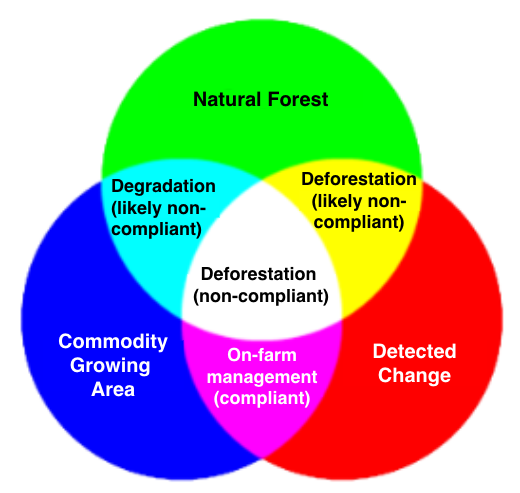
Primary channels:
| Channel | Layer | Data Sources |
|---|---|---|
| Red | Change detection | Union of CCDC (Dynamic World), GFW-GLAD, and JRC-TMF deforestation signals |
| Green | Natural forest baseline | Nature Trace Forest Typology 2020 (FORTY) — Primary Forest + Naturally Regenerating Forest classes, FDP Forest Persistence |
| Blue | Commodity layer | FDP commodity probability models for the target crop |
Color combinations and their meaning:
| Color | Channels | Meaning | EUDR Relevance |
|---|---|---|---|
| Red only | Red | Change detected outside natural forest and commodity areas | Low — may be agricultural rotation or non-forest clearing |
| Green only | Green | Stable natural forest, no change, no commodity | None — healthy forest |
| Blue only | Blue | Stable commodity area, no change, no natural forest | None — existing plantation |
| Yellow | Red + Green | Deforestation detected in natural forest | High — primary EUDR signal |
| Magenta | Red + Blue | Forest loss in a commodity area | Medium — may indicate replanting cycles or on-farm management |
| Cyan | Blue + Green | Commodity in former natural forest (no active change) | Medium — historical conversion, flagged for due diligence |
| White | Red + Blue + Green | Change + commodity + natural forest all overlap | Critical — active conversion of natural forest to commodity |
▶Example: Yellow and Magenta
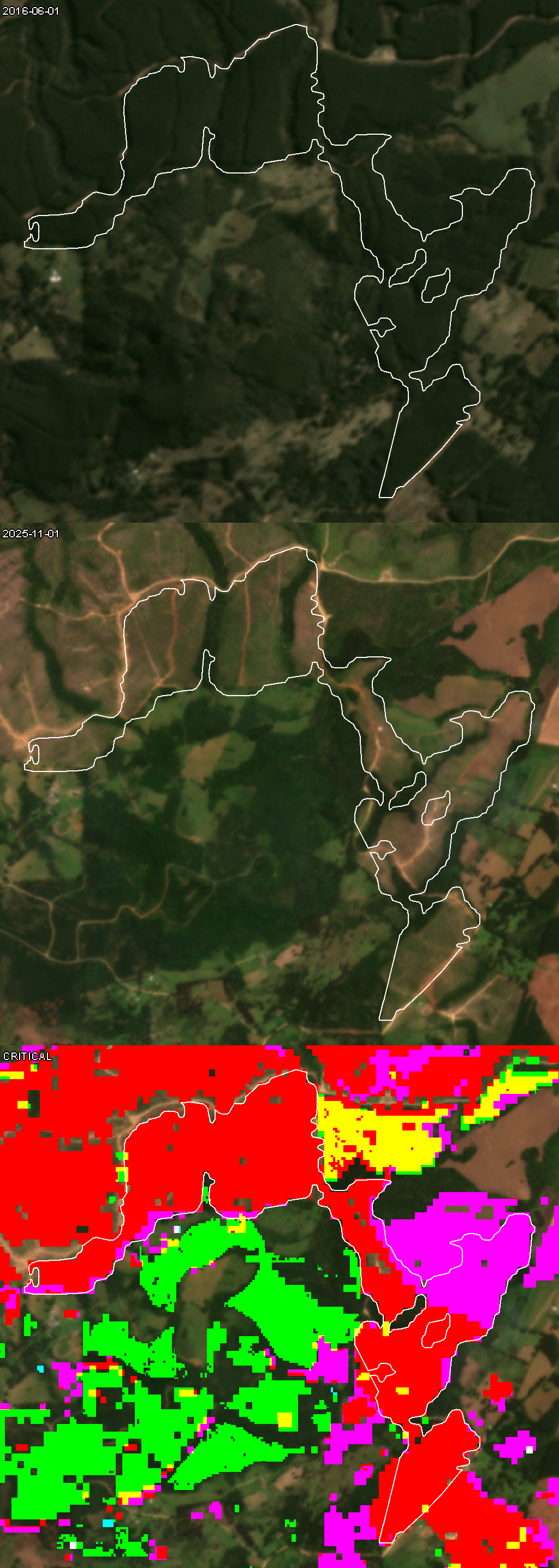
Yellow patches within the plot boundary indicate deforestation in natural forest. Magenta patches indicate forest loss in areas where the commodity is detected. Both require investigation — yellow is the higher EUDR priority.
▶Supply Shed Thumbnails
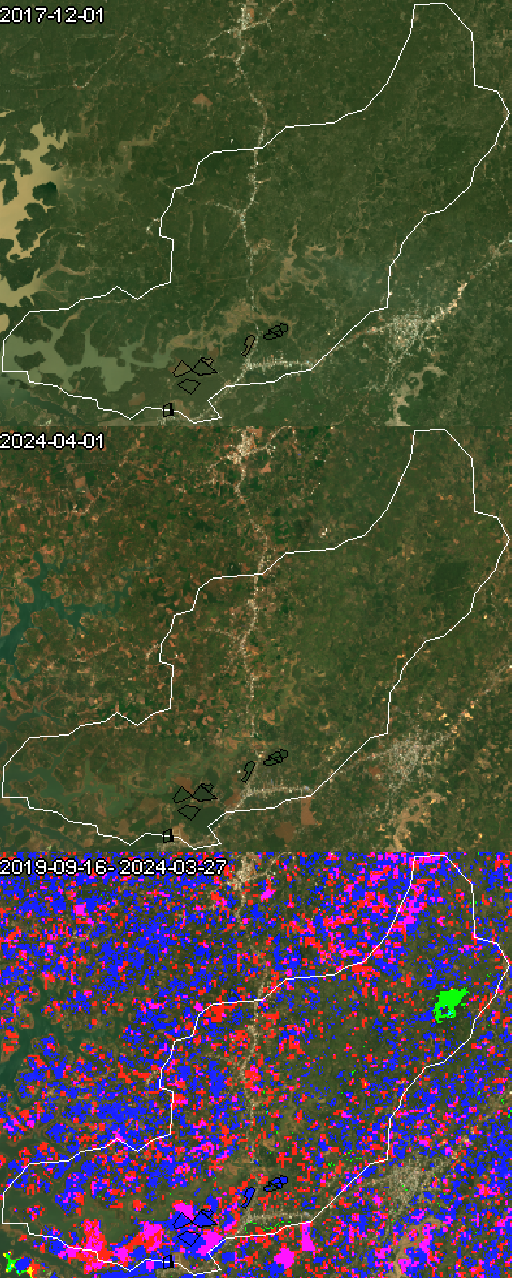
Supply shed thumbnails cover a wider area (the travel-time isochrone around a facility) and show aggregated deforestation patterns across all probabilistic commodity plots.
▶Common Scenarios
Clean plot — Overlay shows predominantly green (stable forest) or no color (non-forest land). No red, yellow, or white. Before/after panels show consistent land cover.
Border detections — Thin strips of yellow/red along plot edges. Usually caused by GPS inaccuracy or digitization error. Check before/after panels: if vegetation is consistent across the boundary, the detection is likely an artifact.
Internal deforestation — Solid patches of yellow or white within the plot interior. Before panel shows canopy; after panel shows cleared land. This is a genuine detection.
Cyan (commodity in natural forest) — Historical conversion that predates the monitoring window. No active change (no red), but flagged for due diligence.
▶Best Practices
- Always compare the overlay with the before/after panels — the overlay is algorithmic, the imagery is ground truth.
- For plots with confidence
mediumor lower, manual thumbnail inspection is strongly recommended. - Yellow and white pixels are the most EUDR-relevant — focus review time there.
- Border artifacts are common with approximate geometries. If detections are confined to edges, improve the boundary data.
▶Biomass Emissions Thumbnails
Biomass emission thumbnails show above-ground biomass (AGB) density change over the monitoring period.
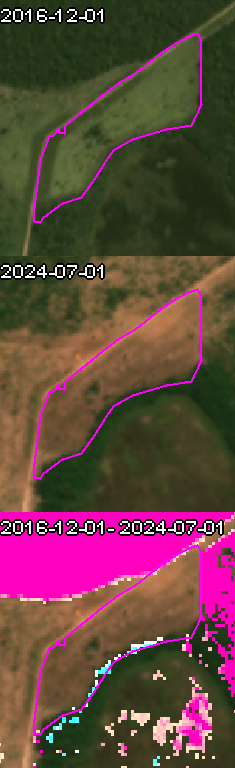
AGB trend (bottom panel) uses a red-blue diverging scale:
| Color | Meaning |
|---|---|
| Deep red | Large biomass loss (high emissions) |
| White | No significant change |
| Deep blue | Large biomass gain (sequestration) |
Emission category mask uses distinct colors:
| Color | Category | Description |
|---|---|---|
| Purple | Non-LUC | Emissions in areas where land cover remained stable (no land use change) |
| Red | LUC emissions | Biomass loss where land cover changed (e.g. forest to cropland) |
| Turquoise | Removals | Biomass gain from regrowth or restoration |
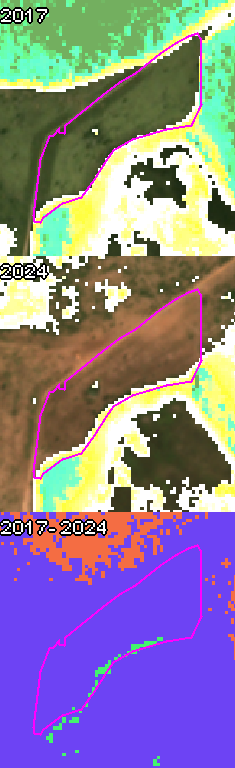
The accompanying land cover thumbnail shows the Dynamic World classification, helping distinguish forested pixels from cropland when interpreting biomass changes:
▶Biodiversity Thumbnails
Biodiversity thumbnails display the Rao's Q diversity index computed from canopy height heterogeneity.
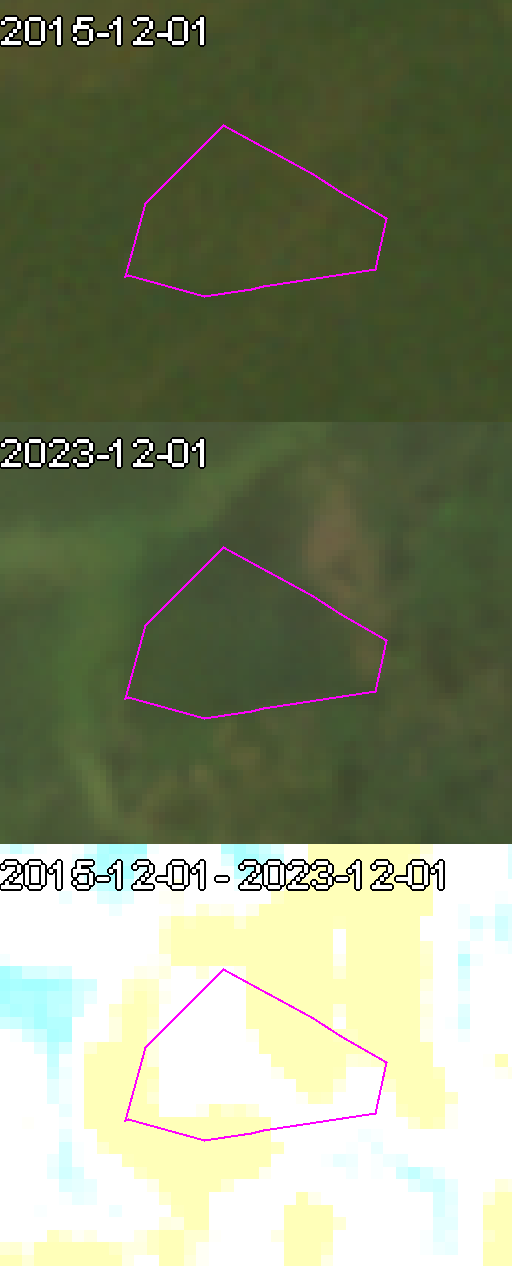
Color scale (blue-to-yellow diverging):
| Color | Interpretation |
|---|---|
| Blue (low values, < 0.5) | Low structural diversity — typically monocultures, plantations, uniform-age stands |
| White (around 0.5) | Intermediate diversity |
| Yellow (high values, > 0.5) | High structural diversity — characteristic of fragmented, biodiverse landscapes with heterogeneous canopy structure |
Interpretation notes:
- Rao's Q measures expected dissimilarity in canopy height between randomly selected pixel pairs. Higher = more structural variation.
- Sudden drops between annual snapshots may indicate selective logging even when canopy cover appears intact.
- Very low values in natural forest areas should prompt further investigation — may indicate degraded or secondary forest.
- Interpret alongside deforestation and emissions metrics for a complete picture of forest health.